Bring the scene to life.
From room tone to the perfect footstep. Find the sounds that make your story feel real.
- Forest_ambience.wavWAV
- Footsteps_gravel.wavWAV
- Door_close.wavWAV
 AudioLumo
AudioLumo is a Mac app for your own sound effects, samples and recordings.
Search, preview and export WAVs for Premiere or DaVinci.
LAUNCH OFFER
Only for the first 100 purchases
First come, first served.
One-time purchase. No subscription.
Until 30 November 2026 at the latest. Then €49.
See the full feature listSound effects, music and recordings spread across folders and drives. You know you have the perfect sound, but finding the file keeps interrupting your work. AudioLumo makes your own collection searchable in one place on your Mac.
Your everyday essential for a growing sound archive.
See the real app in actionFrom room tone to the perfect footstep. Find the sounds that make your story feel real.
Keep client recordings, music cues and go-to effects within reach, from one brief to the next.
Find the transition, audition the moment and take a WAV into Premiere or DaVinci.
Rediscover textures, tag your recordings and turn a growing archive into your creative toolkit.
Illustrative workflow with example filenames. Watch the real app below.
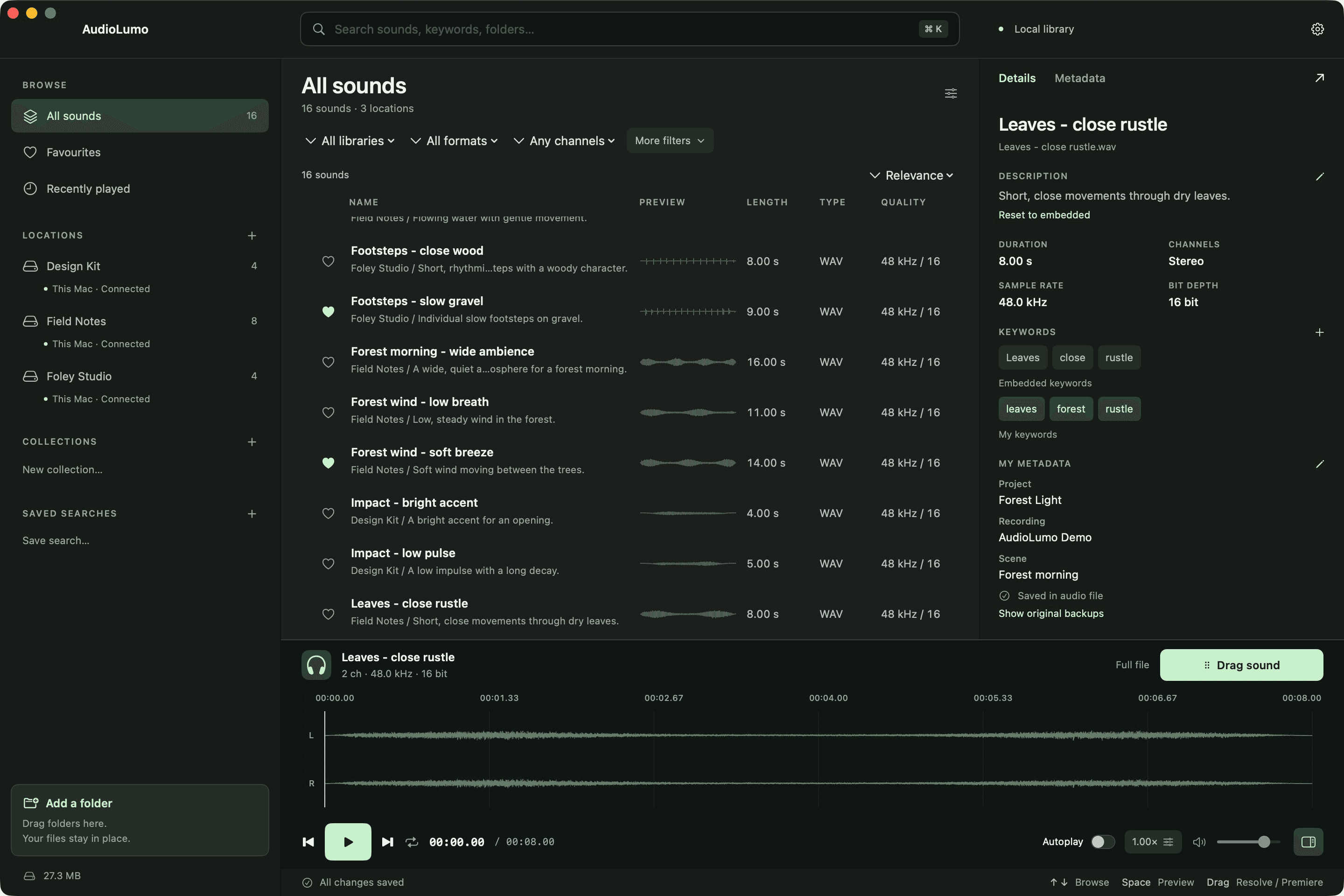
From your first folder to the final WAV. Explore the complete workflow, or jump straight to the feature you need.
AudioLumo is a native Mac app for your own sound effects, samples and recordings. Turn the folders you already have into one searchable library, then find, preview and export the sound your edit needs.
Add a folder, or drag it into AudioLumo. Your original audio stays in place. The app indexes filenames and technical metadata, then watches your registered folders for new, changed, moved and deleted files.
Browse libraries and subfolders with clear drive names, full paths and clickable breadcrumbs. Folder cards take you deeper into your indexed archive, while the parent control takes you back.
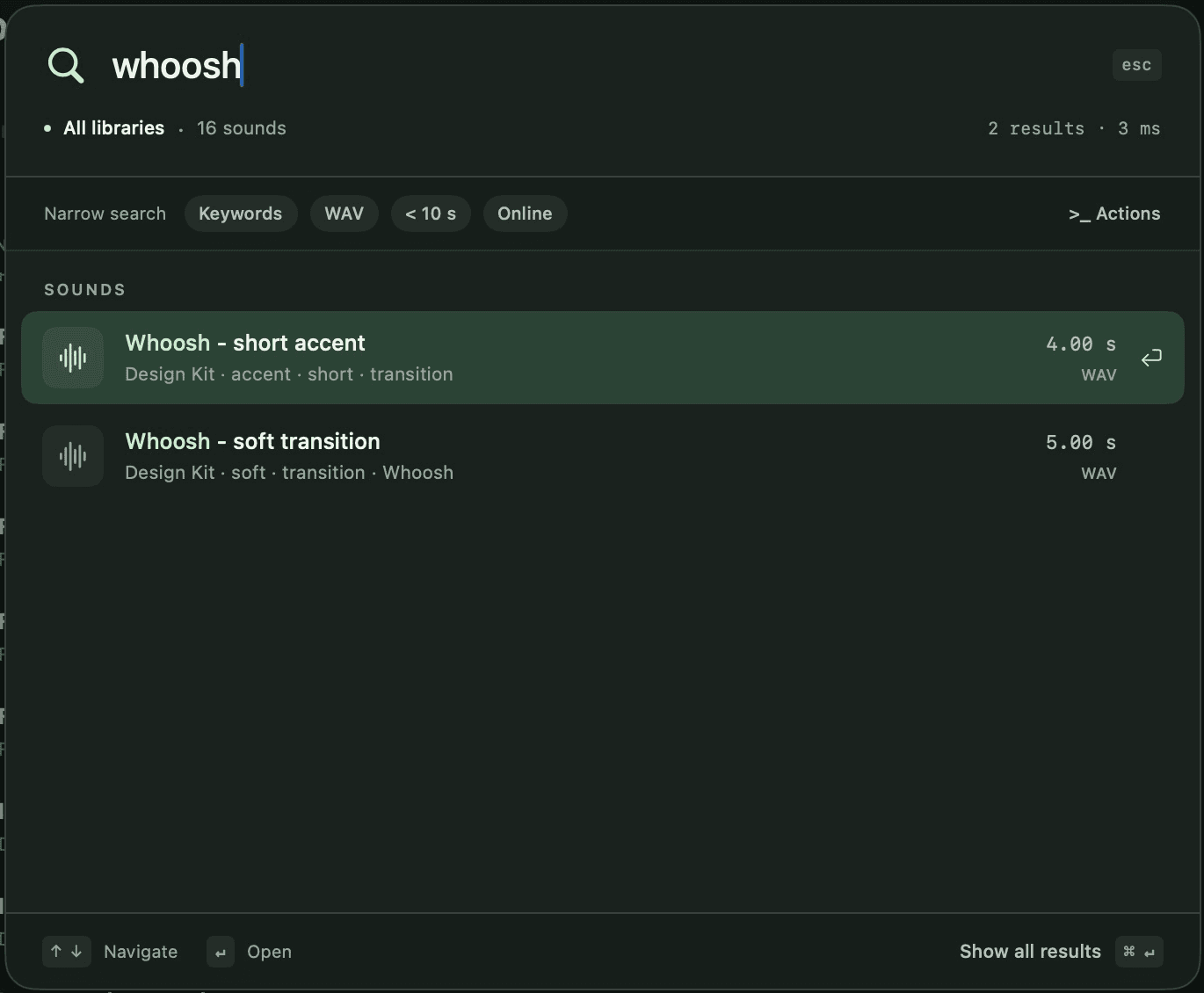
Press Command K to search names, paths, descriptions, keywords and your custom metadata. Partial words work as you type. Use the arrow keys to choose a result, Enter to open it, or Command Enter to show every match.
Narrow results by format, duration, channels or sample rate. Combine search terms, exact phrases, exclusions and OR. Field queries let you target keywords, categories, libraries and technical properties.
Save a search together with its filters and folder or collection scope. Reopen recent queries from your local history. In quick search, type a greater-than sign to find actions such as adding folders or opening settings.
Mark favourites with the heart or Command D, and group sounds into collections for a project. The recently played view helps you return to sounds you have already auditioned.
Click a sound to preview it and see its real waveform. The playing row is clearly marked. Click the waveform to seek, or press Space to play and stop. Autoplay can be switched off whenever you prefer manual control.
Drag across the waveform to select a range, or set in and out points with I and O. Enter exact boundaries when you need them, loop the selection, and double-click to clear it.
Adjust speed and pitch, or switch to mono. AudioLumo can prepare those changes in a WAV export, including a selected range, while keeping your source audio unchanged.
Drag out the sound or selection, or press Command Shift E to save a WAV. Choose a lasting export folder so editing projects keep their media. Bring the exported file into Premiere Pro, DaVinci Resolve or another editor that accepts WAV.
Add descriptions and keywords, then create your own fields for a project, scene or microphone. Everything becomes searchable. Edit multiple selected sounds together, and use undo and redo to correct catalogue edits.
Save your catalogue edits and, for supported formats, AudioLumo writes its annotations into the audio file without re-encoding the sound. Other variants use a sidecar. An original backup is made before the first file edit. Offline writes wait for reconnection.
Your indexed archive stays searchable when a drive is disconnected. Names, metadata and folder navigation remain available. Listening and new exports need the original files; AudioLumo explains when a drive, file or permission is unavailable. Moved folders can be reassigned.
Cloud-synced folders can be catalogued, but AudioLumo does not automatically download placeholders. Make the original files available locally in Finder before playback or export. Your storage provider still controls its own synchronisation.
Back up the catalogue from settings. Exchange descriptions, keywords, custom fields and favourites through CSV. Import an existing local Soundly catalogue without changing its source database. Your own metadata survives a rescan.
Choose light, dark or system appearance, and switch between English and German. Set a waveform cache limit, clear it, or disable it. Settings also brings together autoplay, export locations, catalogue tools and keyboard shortcuts.
Your audio stays local, with no upload to an AudioLumo server and no extra account. AudioLumo organises your own collection; a sound library is not included. One-time purchase. No subscription. Discover AudioLumo, and keep creating.
A thought, a search, your sound. Press ⌘K to search names, keywords, paths and your own metadata.
Narrow it down by format, duration or channels. Save the searches you come back to.
Works with Premiere and DaVinci.
Click to preview. Mark the moment you need. Take it with you as a WAV. Right where you are working.
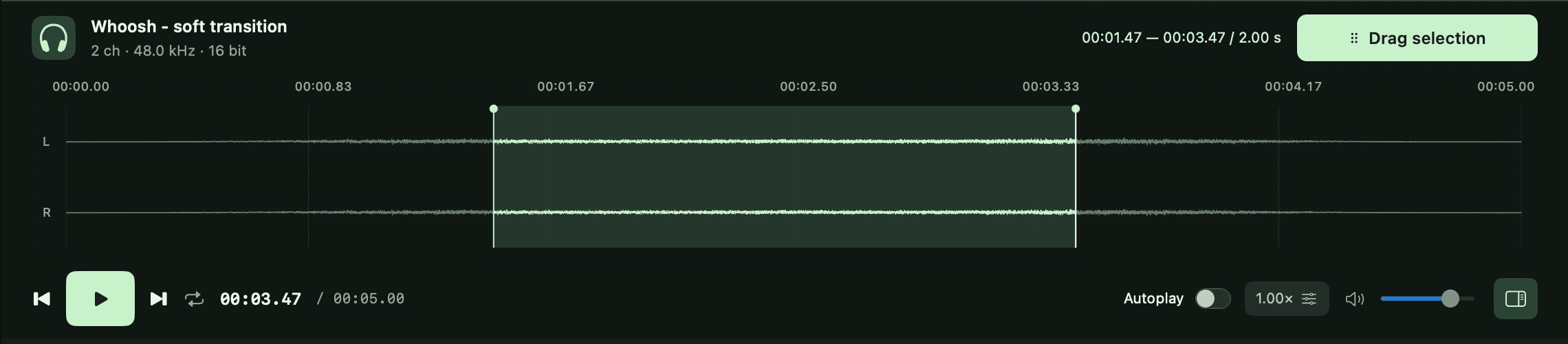
Preview on click, or press play when you are ready. The playing track lights up.
Waveforms, in/out points and looping. Adjust speed, pitch or mono when you need to.
Export a whole sound or just a selection as a WAV and bring it into your project.
Actual app recordings, shortened for the demos.

Project, scene, microphone. Make your own fields, add keywords and describe what makes a sound special.
It all becomes searchable. Changes stay in your catalogue and, for supported files, are written to the audio file with a backup of the original. Other variants use sidecar files.
Watch the metadata demoYour files stay where they are. Folder paths, subfolders and drive names always show you where you are.
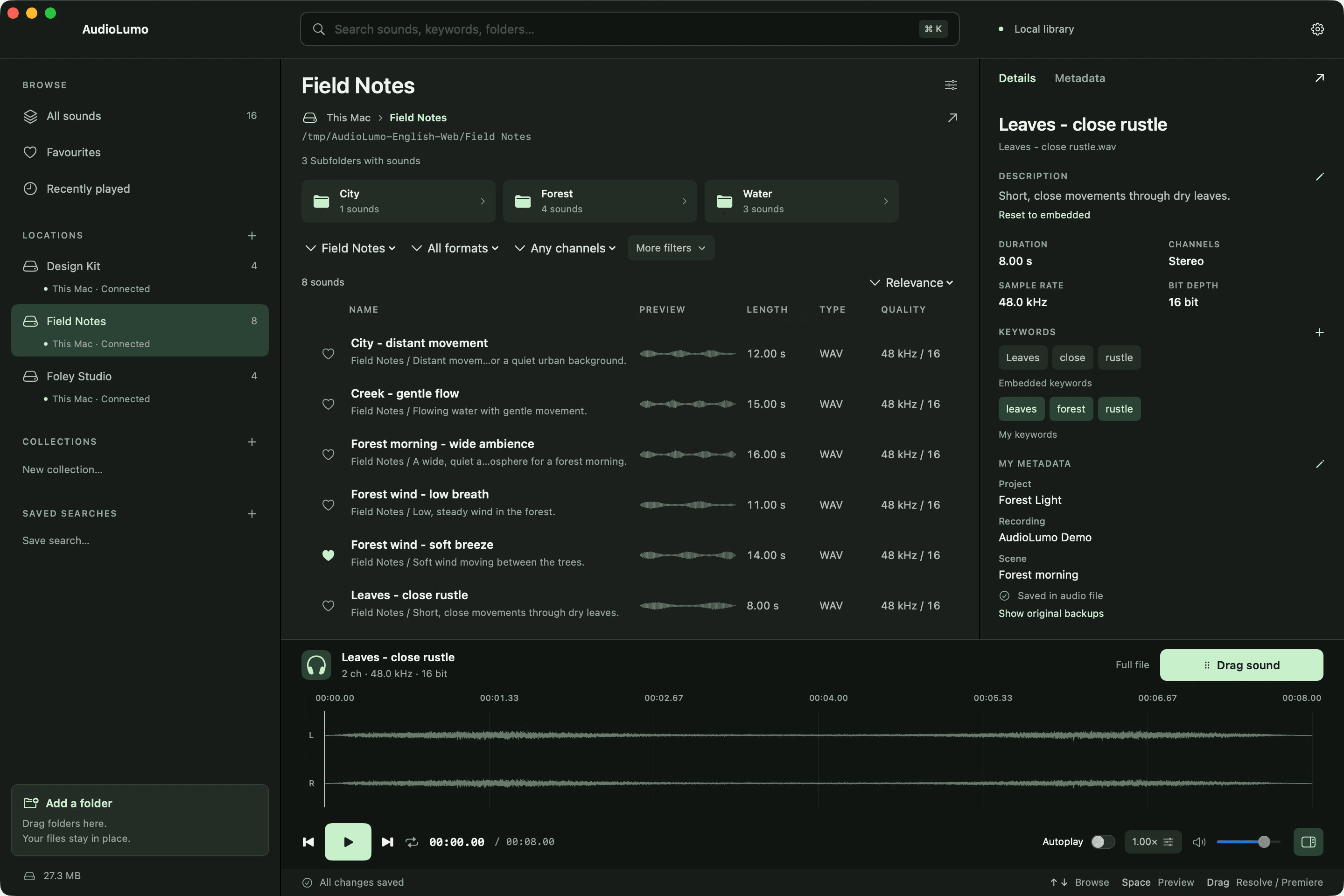
Indexed names and metadata remain searchable. If a preview is unavailable, AudioLumo tells you why. Reconnect your original files to listen or export.
Watch the folder demoCOMING IN UPDATE 1.1
The same file in several folders? AudioLumo finds identical copies by checking their contents with SHA-256, even when their names differ.
Find byte-identical files across your added library folders. No audio upload needed.
Review duplicate groups and select the individual copies you want to move to the macOS Trash.
Two confirmations before moving files. Contents are checked again, and at least one distinct copy stays.
Matches identical file contents, not similar-sounding recordings. Different encodings or changed embedded metadata are treated as different files.
Explore the next updateFrom your first folder to the final WAV.
Everything in the first release, plus a clear look at the next update.
A local sound library
that feels like your own.
LAUNCH OFFER
Only for the first 100 purchases
First come, first served.
Then €49. From 1 December 2026 at the latest.
The offer ends after 100 purchases or on 30 November 2026 at 23:59 CET — whichever comes first.
One purchase. No recurring payments.
macOS 14 or later · Apple Silicon
Planned German price. Release in preparation.
Sound library not included.
Yes. AudioLumo is a one-time purchase, with no subscription or recurring payments. The launch offer is €29; the regular price is €49. The final local purchase price will be shown in the Mac App Store.
The €29 launch price is limited to the first 100 purchases and ends on 30 November 2026 at 23:59 CET at the latest. The regular price of €49 applies once 100 purchases have been completed or from 1 December 2026, whichever comes first. Both prices are one-time purchases, with no subscription.
Yes. AudioLumo creates a local catalogue and does not upload your audio to a server. You choose which folders to add. If you choose a cloud-synced folder, your storage provider’s own synchronisation still applies.
Yes. Add your folders; indexing does not move your originals. You can also import a Soundly catalogue in read-only mode. Not every Soundly feature or collection is imported.
Common macOS formats including WAV, AIFF, MP3, M4A, FLAC and CAF. Playback and metadata support depend on the specific codec and file variant. Ogg/Opus support is not currently promised.
For supported files, yes, with a backup of the original. Other variants use sidecar files. AudioLumo fields are searchable, but are not automatically recognised by every other audio app. Changes for disconnected drives remain queued.
Export whole sounds or selected ranges as WAV files, then import them into Adobe Premiere or DaVinci Resolve. Your editor uses those audio files in your project.
AudioLumo is a tool for your existing library. The images and demos show the real app with 16 original, synthesised demo sounds. A commercial sound pack is not included.
The Mac App Store release is in preparation. The launch offer is €29 for the first 100 purchases, until 30 November 2026 at the latest; after the earlier limit is reached, the regular one-time price is €49. Sales can start once the build, privacy information and store review are complete.

